Quick links
Jump to the most common billing tasks.

View or pay my bill
Find the right billing portal for your area and make a payment.

My account
Manage your account, services, and billing preferences.
Billing FAQs
Please refer to your latest statement for your account number on the front of your bill. It appears on the first page.
You should mail your payment to the address located on your bill statement. For your protection, please do not send cash when mailing your payment. Place your account number on the check or money order and be sure to keep a copy of the money order for your records.
Yes. Just visit your online customer portal to enroll in recurring automatic payments or make a one-time payment. Major credit cards and checking account transfers are acceptable means of online payment. You can also disable automatic payments or change your automatic payment settings online.
Yes. You can also set up online payments directly via your financial institution. Just look for Consolidated or Fidium as the biller name from within your financial institution's online banking application.
To make a one-time payment by phone via the automated system or with an agent, call 1.844.968.7224. Please note that a convenience fee will be charged for all phone payments.
The recurring, automatic bill payment setting within your online customer portal allows your financial institution to automatically transfer the amount of your monthly bill from your checking, savings or credit card account to Consolidated Communications each month on your behalf. Upon selecting this service, you will receive an email confirming your subscription to online payment services and notifying you of the day of the month when the amount due will be transferred from your account.
You can update your automatic payment settings or disable automatic payments at any time through your online customer portal.
Bill pay options include:
- Mail your payment to the address on your bill statement
- Subscribe to recurring automatic online payments
- Make a one-time quick payment online
- Pay by phone (convenience fee will apply)
For Texas customers, you can also pay your bill at any Fidelity Express location. Click here to find a location near you.
Payment methods accepted:- Check or money order via mail
- Electronic check (using the routing number and account number from your check)
- Credit/debit card (Visa, MasterCard, and Discover)
For your protection, please do not send cash when mailing your payment.
You may opt out of receiving a paper bill in the mail by logging into your online customer portal and setting your preference. You may also reinstate receiving a paper bill at any time.
If your statement is not paid by its due date you may be assessed a late charge. Continued nonpayment may result in your service being discontinued. Signing up for automatic, recurring online payments will ensure that you don't miss a payment. Simply log in to your online customer portal and follow the instructions.
Most voice services and all internet services bill in advance. For a new customer, that means any applicable installation charges were combined with standard charges for monthly service plus any calling features and leased equipment. These standard charges include partial charges for the current billing month, as well as full charges for a month of service billed in advance. Charges for long distance calls and telephone equipment purchased from Consolidated Communications will be billed after they appear on your account.
Please contact Consolidated Communications regarding reinstatement of your service at 1.844.968.7224, and we will work with you to set up a payment plan and reinstate your services.
Help understanding my bill
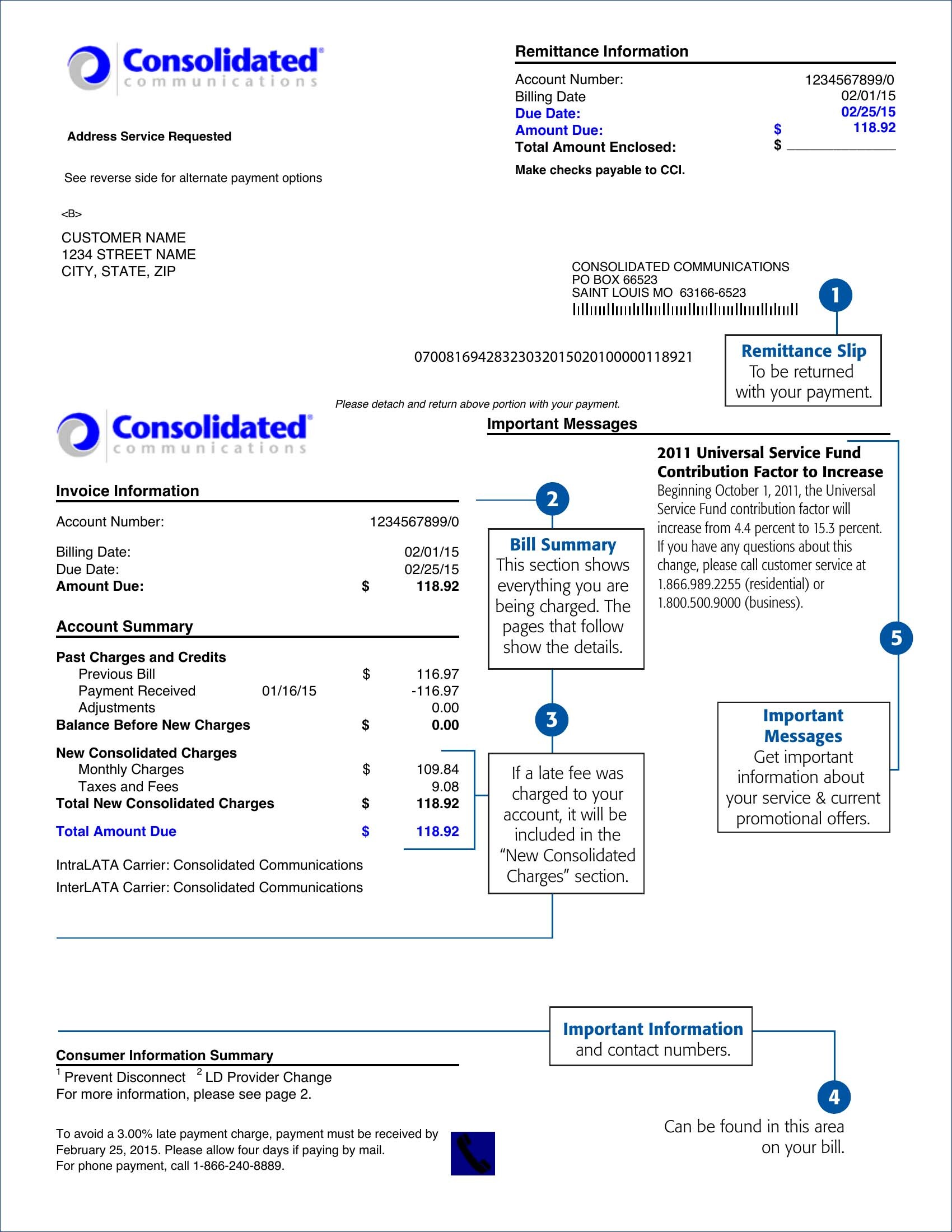
Use the annotated guide below to understand each section of your Consolidated Communications bill statement.